

- Agents (Team)
- Tasks and Kanban board
- Files (task artifacts, workspace disk, agent files)
- Workflows (pipeline definitions)
- Routines (scheduled runs)
- Events (audit stream)
- Optional Project work directory (path on the Bridge machine)
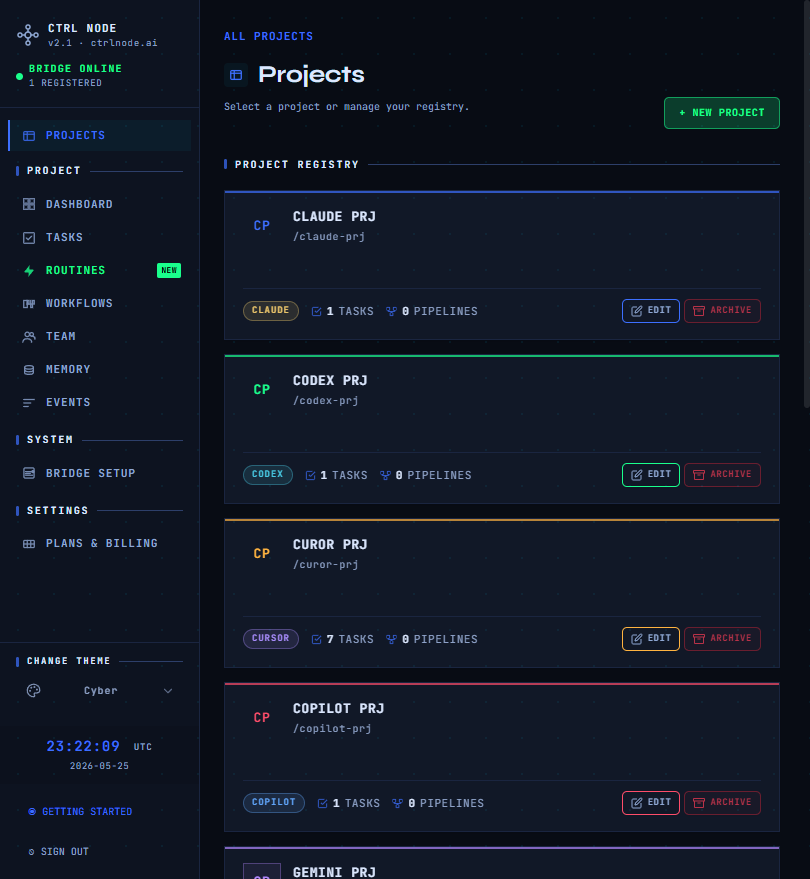
Open Projects
Route:/projects
- New project — name, slug, default agent type (CLI badge), optional project work directory
- Select a card to enter the project (sidebar shows CLI badge + project name)
- Archive / restore / delete from the project menu
Switching projects
Click the project context in the sidebar (colored CLI badge + name) to return to/projects.
After you create a project
You are redirected to:Related
Project work directory
Configure the Bridge path for WORK DIRECTORY tasks and Files WORKSPACE.
Create task
MODE (OUTPUT ONLY vs WORK DIRECTORY) when creating tasks.