Documentation Index

Fetch the complete documentation index at: https://docs.ctrlnode.ai/llms.txt

Use this file to discover all available pages before exploring further.

Route

/projects/{projectId}/dashboard
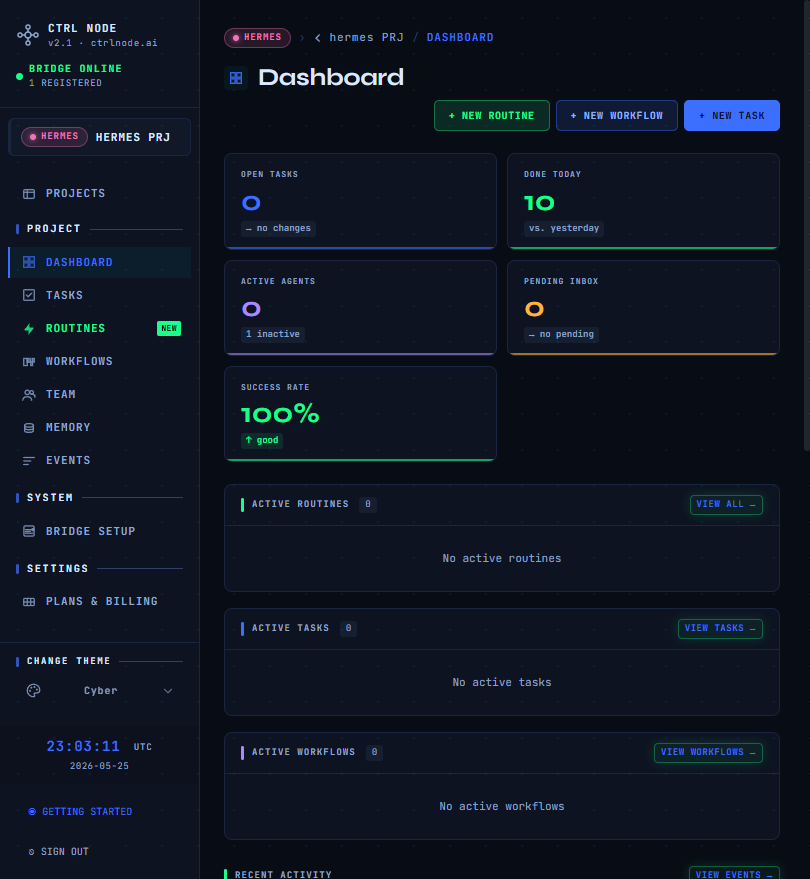
The Dashboard is the best place to start each session. The in-app Getting Started guide auto-opens here for new users. Project dashboard

What you see

SectionPurpose
KPIsOpen tasks, active agents, recent activity counts
InboxTasks waiting for an agent
Active tasksWork in progress
AgentsOnline / offline status and load
RoutinesUpcoming or recent scheduled runs
WorkflowsPipeline definitions and active runs
FeedLatest events and task messages
Data refreshes in real time over SignalR when the Bridge and agents are connected.

Bridge disconnected

If the Bridge is offline, a banner appears at the bottom of the screen. Many actions (start workflow, clone, rerun) require a connected Bridge.
Fix Bridge connectivity via Bridge Setup before debugging task delivery.

Mobile

The top bar shows the section title; the in-page Dashboard heading may be hidden to avoid duplication. Next: Tasks