

Route
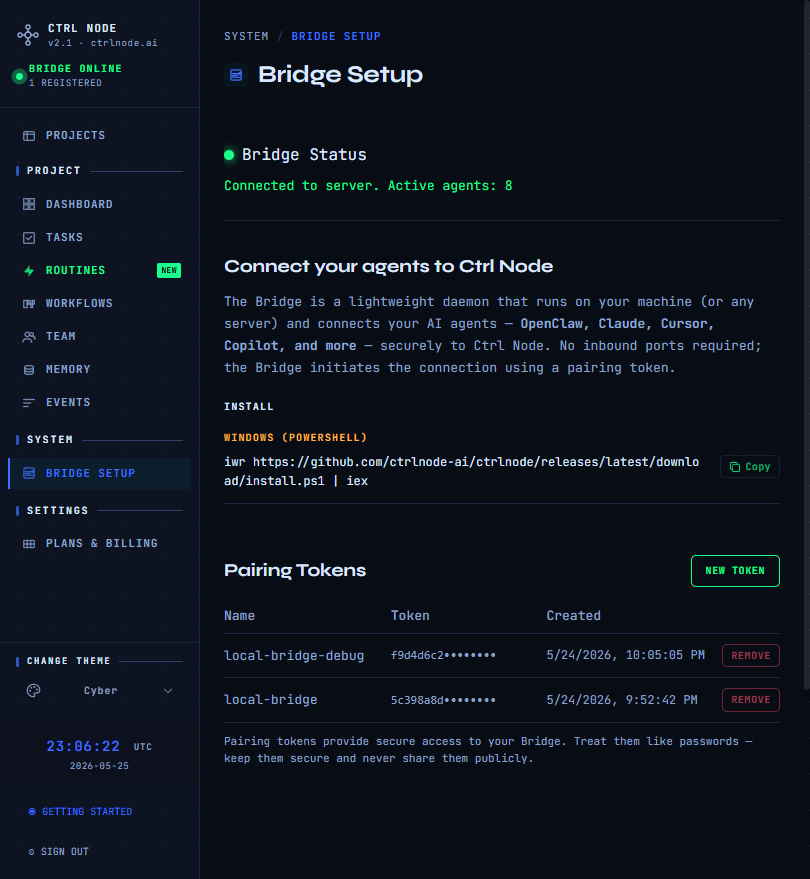
Bridge status
Green dot = Connected (shows active agent count). Red = Disconnected — verify the Bridge process is running with a valid token.Pairing tokens
- Click New Token
- Copy the token when shown — it will not be displayed again
- Revoke old tokens you no longer use
/setup/token during onboarding if needed.
Install
Windows (PowerShell):~/.ctrlnode/.env with PAIRING_TOKEN and workspace paths.
Run
- Windows
- Linux / macOS
~/.ctrlnode/.env with PAIRING_TOKEN, SAAS_URL, and BASE_PATH (workspace parent). See Install.
Troubleshooting
Previous: Events · Quickstart