> ## Documentation Index
> Fetch the complete documentation index at: https://docs.ctrlnode.ai/llms.txt
> Use this file to discover all available pages before exploring further.
# Bridge Setup
> Pairing tokens, install scripts, and connection status
## Route
```text theme={null}
/system/bridge-tokens
```
Breadcrumb: **SYSTEM → BRIDGE SETUP**
**This is the most important step.** Without a connected Bridge, agents do not appear in Team and tasks are not dispatched.
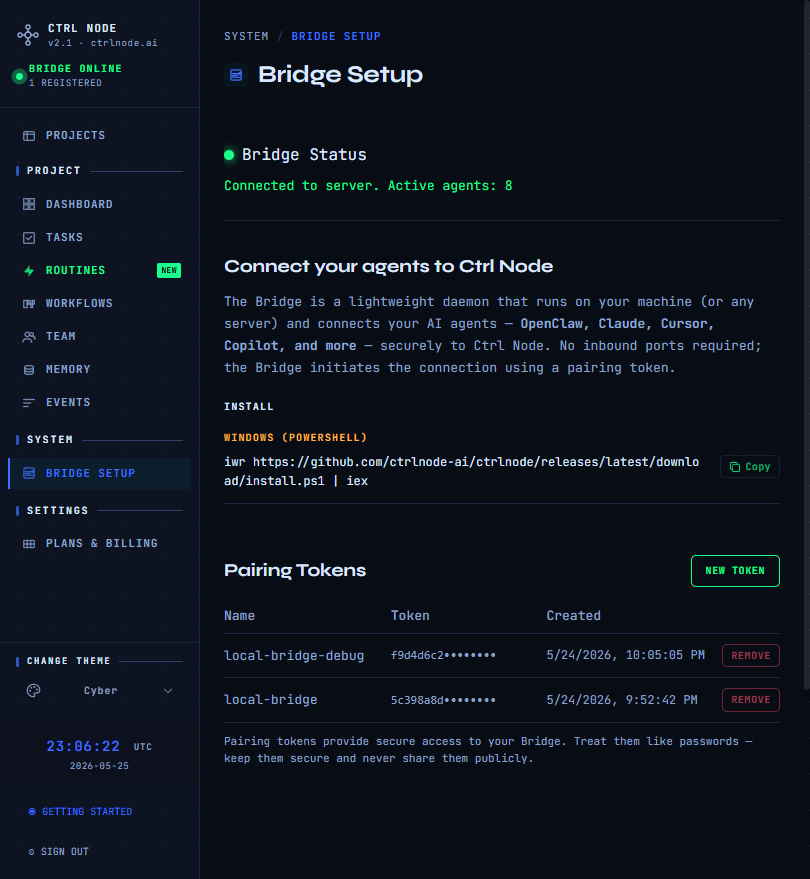
## Bridge status
Green dot = **Connected** (shows active agent count). Red = **Disconnected** — verify the Bridge process is running with a valid token.
## Pairing tokens
1. Click **New Token**
2. Copy the token when shown — **it will not be displayed again**
3. Revoke old tokens you no longer use
Regenerate from `/setup/token` during onboarding if needed.
## Install
**Windows (PowerShell):**
```powershell theme={null}
iwr https://github.com/ctrlnode-ai/ctrlnode/releases/latest/download/install.ps1 | iex
```
**Linux / macOS:**
```bash theme={null}
curl -fsSL https://github.com/ctrlnode-ai/ctrlnode/releases/latest/download/install.sh | bash
```
Installers write `~/.ctrlnode/.env` with `PAIRING_TOKEN` and workspace paths.
## Run
```powershell theme={null}
$env:PAIRING_TOKEN=""
ctrlnode
```
```bash theme={null}
PAIRING_TOKEN= ctrlnode
```
Installers write `~/.ctrlnode/.env` with `PAIRING_TOKEN`, `SAAS_URL`, and **`BASE_PATH`** (workspace parent). See [Install](/bridge/install).
Open source Bridge: [github.com/ctrlnode-ai/ctrlnode](https://github.com/ctrlnode-ai/ctrlnode)
## Troubleshooting
| Issue | Check |
| ------------------ | ---------------------------------------------------------------------- |
| Stays disconnected | Token copied correctly; Bridge process running |
| Auth errors | No duplicate `PAIRING_TOKEN=` in `.env`; shell env not overriding file |
| Agents missing | Bridge connected; agent registered in **Team** |
Previous: [Events](/getting-started/events) · [Quickstart](/quickstart)